HatchZipCLI + GUI
In-Place Archive Extractor // MIT OR Apache-2.0

Extract Huge Archives In Place Without Double Disk Space

A 180 GB archive that unpacks to 200 GB needs 380 GB of disk with WinRAR, 7-Zip or unzip, because the archive and the extracted files have to exist at the same time. HatchZip needs a little over 200 GB: it extracts from the end of the archive and cuts each finished part off the archive file, so the space comes back as it goes.

Free and open source for Windows, macOS and Linux. Includes both a native Desktop GUI (with right-click context menu integration) and the hatchzip / hz command-line tool.

PRIMARY DESKTOP DOWNLOADSAll releases & checksums →
curl -fsSL https://raw.githubusercontent.com/xevrion/hatchzip/main/install.sh | sh

Unsigned binary notice: HatchZip is not code-signed yet. On Windows SmartScreen, choose "More info" → "Run anyway". On macOS, open the app once, then allow it in System Settings → Privacy & Security. Older Intel Mac? Get the Intel .dmg.

01 // ARCHITECTURE

How It Works & Crash Safety

Why HatchZip works from the end of the file, how .tar.gz streams from the front via sparse hole punching, and why an interrupted run never loses data.

ftruncate / SetEndOfFile

Reverse Truncation (ZIP, 7z, tar, Split .001)

Every operating system and filesystem (including FAT32 and exFAT) can shorten a file from the end. ZIP and 7z keep their index at the very end, so HatchZip first copies that index into <archive>.hatchzip-tail, then extracts independent units (files or solid blocks) starting from the last one and truncates the archive after each committed batch.

fallocate / F_PUNCHHOLE / FSCTL_SET_SPARSE

Forward Hole Punching (.tar.gz & ≥512 MiB Entries)

A .tar.gz is a single compressed stream decoded from the front. HatchZip scans the entire stream first to verify all gzip CRC-32s before changing anything. It then extracts front-to-back, journaling deflate block restart points (plus the 32 KiB sliding window) every 256 MiB and punching holes in the consumed archive bytes on NTFS, APFS, ext4, XFS, and btrfs.

--keep-free 2GB

Pre-Flight Space Replay & 2 GB Margin

Before modifying anything, HatchZip replays the entire extraction schedule to find the exact moment of peak disk usage (output plus the largest single unit or solid block). By default it keeps 2 GB of free space untouched (--keep-free) so your OS disk never hits zero.

Zero Overwrite

CRC-32 Verification & Hostile Archive Defense

Every file is checked against its CRC-32 as it extracts; a damaged file stops the run immediately and remains inside the archive. Existing files are never overwritten. Path traversal, overlapping entries, duplicate paths, and setuid/setgid bits are refused upfront; symlinks are created only after all regular files land.

Atomic 5-Step Batch Protocol (Crash-Safe at Any Point)

STEP 01Select Batch

Pick uncommitted units from the tail that fit in current free space minus --keep-free (up to 512 units / 2 GB).

STEP 02Parallel Decode

Worker threads decompress units into <name>.hatchzip-part, verify CRC-32 and byte length, then rename into place.

STEP 03Physical Flush

Force data to physical media via syncfs (Linux), F_FULLFSYNC (macOS), or per-file/directory fsync.

STEP 04Atomic Commit

Write updated committed_len to temporary journal, flush, and atomically rename over <archive>.hatchzip.

STEP 05Truncate Tail

Shorten the archive file (or delete emptied split volumes) down to committed_len, freeing disk blocks for the next batch.


FIG 01 // IN-PLACE EXTRACTIONhow.webp
HatchZip extracts the last part of the archive into the destination folder, then cuts that part off the archive file so the disk never holds both at once.
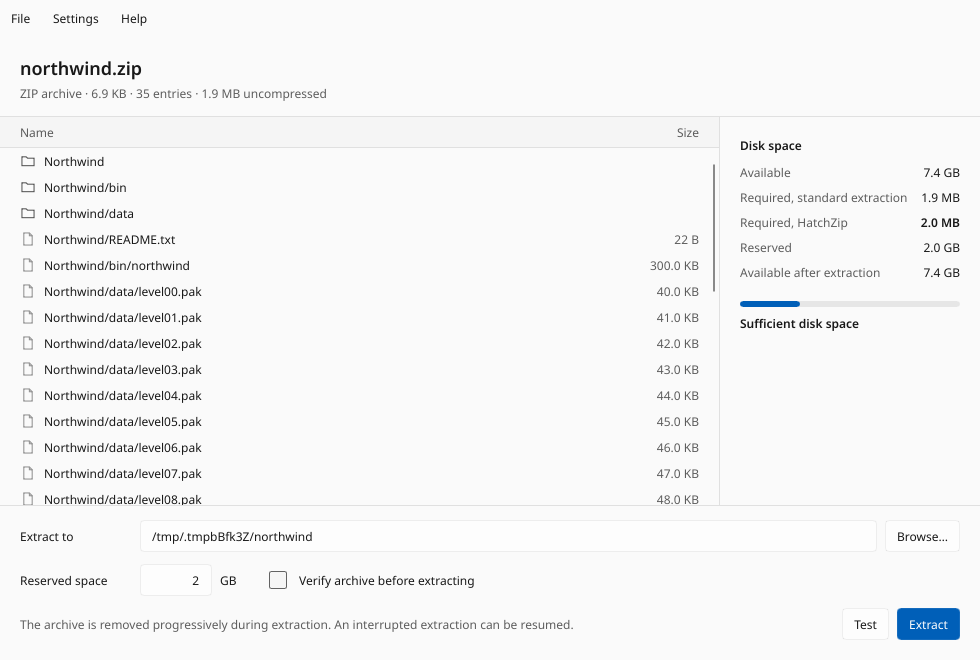
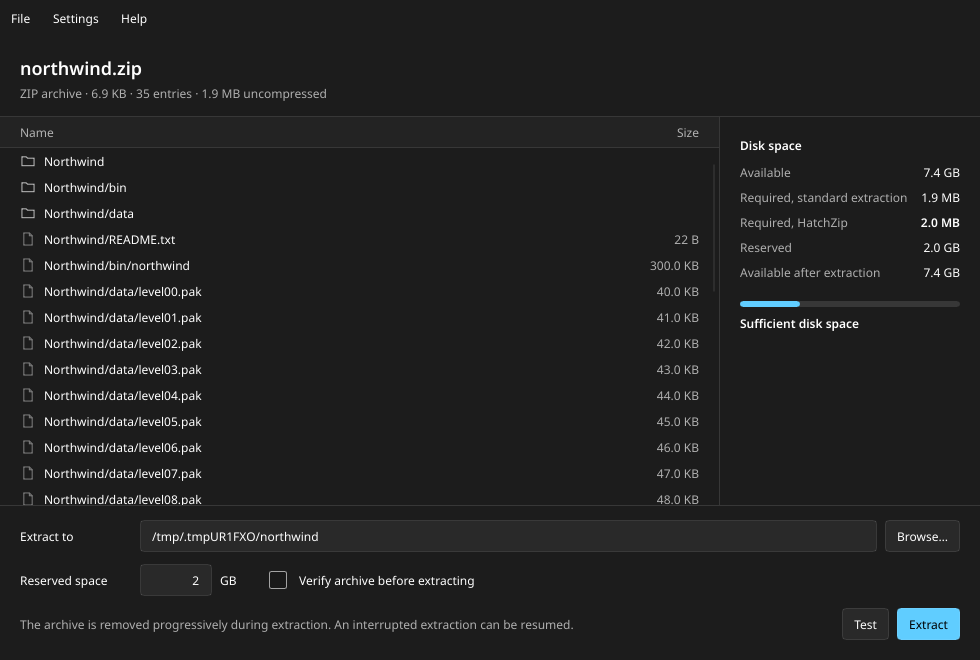
FIG 02 // DESKTOP GUI & SPACE PLANhatchzip-gui
The HatchZip desktop app inspecting an archive: entry list on the left, exact disk budget vs. standard extraction on the right.The HatchZip desktop app inspecting an archive: entry list on the left, exact disk budget vs. standard extraction on the right.
The HatchZip desktop app inspecting an archive: entry list on the left, exact disk budget vs. standard extraction on the right.
02 // DOWNLOAD & CLI

Installation & Command Reference

Use the native GUI via right-click "Extract here" or drag-and-drop, or automate extractions in the terminal with hatchzip (short alias hz).

Three Steps with the Desktop App
  1. Install HatchZip. Because binaries are not code-signed yet, on Windows click "More info" → "Run anyway"; on macOS open the app once and allow it in System Settings → Privacy & Security.
  2. Right-click any archive and choose HatchZip → Extract here (Windows and Linux; under "Show more options" on Windows 11).
  3. Or launch the HatchZip app, open or drag an archive onto the window, verify the space check on the right, and click Extract.
Desktop Application Installers (also adds hatchzip & hz to PATH)
PlatformPackage / ArchiveFormat & Notes
Windows 10 & 11 (x64)HatchZip-x64-setup.exeInstaller (per-user, adds context menu, no admin needed)
macOS Apple Silicon (M1+)HatchZip-aarch64.dmgDisk image (.dmg)
macOS IntelHatchZip-x86_64.dmgDisk image (.dmg)
Linux x64 (Any distro)HatchZip-x86_64.AppImageAppImage
Debian / Ubuntu (x64)hatchzip_amd64.debdeb package
Fedora / openSUSE (x64)hatchzip-x86_64.rpmrpm package
Standalone Command-Line Archives
PlatformPackage / ArchiveFormat & Notes
Windows x64hatchzip-x86_64-windows.zipzip
macOS Apple Siliconhatchzip-aarch64-macos.tar.gztar.gz
macOS Intelhatchzip-x86_64-macos.tar.gztar.gz
Linux x64hatchzip-x86_64-linux.tar.gztar.gz
Linux ARM64hatchzip-aarch64-linux.tar.gztar.gz

One-Line Terminal Install (Verifies SHA-256, No Root Required)

Linux / macOS (sh)
curl -fsSL https://raw.githubusercontent.com/xevrion/hatchzip/main/install.sh | sh
Windows (PowerShell)
irm https://raw.githubusercontent.com/xevrion/hatchzip/main/install.ps1 | iex
Rust (Cargo)
cargo install hatchzip
1. Check if an archive fits (modifies nothing)
$ hatchzip check game.zip
game.zip  180.2 MB zip, 200.0 MB uncompressed in 22 entries
  available                    50.5 MB
  standard extraction needs    200.0 MB
  required                     29.9 MB (+5.0 MB reserved)
  available after              30.6 MB
2. Extract in place, split archives, or custom output directory
$ hatchzip extract game.zip                 # extracts into ./game/ and removes game.zip as it goes
$ hatchzip extract game.zip -o D:\Games\Foo # extract to another path
$ hatchzip x game.7z.001                    # split archive; passing any volume name finds the whole set
$ hatchzip extract rare.zip --verify-first  # read & verify every checksum before deleting any bytes
3. Pause, resume after crash, or restore a half-extracted archive
$ hatchzip extract game.zip   # press Ctrl+C (or after power loss): run the exact same command to resume
$ hatchzip restore game.zip   # abort permanently: appends a fresh index so 7-Zip/unzip can open remaining entries
$ hatchzip list game.7z       # list entries and sizes without changing anything
$ hatchzip test game.7z       # verify all checksums without writing output
Core CLI Flags & Environment Variables
Flag / EnvBehavior
-o, --output <dir>Output directory. Defaults to a folder named after the archive next to it (must be empty or not exist yet).
--keep-free <size>Safety margin of free disk space HatchZip never touches (e.g. 500MB, 10GB). Default: 2GB.
--verify-firstRead the entire archive and verify every checksum before deleting anything. Recommended for irreplaceable downloads.
-y, --yesSkip confirmation prompt. Required for non-interactive scripts.
--password / HATCHZIP_PASSWORDDecrypt password-protected ZIP (ZipCrypto/AES) and 7z (AES + encrypted headers). Tested on one file before deleting anything; never saved to disk.
CLI Exit Status Codes
Exit CodeMeaning
0Done — extraction or check completed.
1General failure. If extraction had started, progress is safely saved in .hatchzip.
2Invalid command-line arguments or usage.
3Not enough free disk space. Nothing was changed.
4Damaged or hostile archive refused. Nothing was deleted.
5Password required or incorrect password supplied.
130Stopped with Ctrl+C. Run the same command again to resume.
03 // MEASURED RESULTS

Real-World Benchmarks

Tested with 200 MB of real game data (21 files) packed by standard tools, extracted on a 220 MiB tmpfs disk with only ~50 MB of free space remaining.

200 MB Game Data (21 files) on a 220 MiB Disk (~50 MB Free)
Archive Workloadunzip / 7-ZipHatchZip Result
ZIP, 180 MB[FAIL]unzip ran out of space at file 6 of 21[PASS]Finished, every file byte-identical
7z from 7-Zip 25.01, -ms=20m (10 solid blocks)[FAIL]Needs 380 MB[PASS]Finished in 0.64 s, every file byte-identical
7z split into 5 volumes of 40 MB (.7z.001 … .005)[FAIL]Needs 380 MB[PASS]Finished; volumes deleted one at a time, peak 210 MB used
tar from GNU tar, 200 MB[FAIL]Needs 400 MB[PASS]Finished in 0.12 s, every file byte-identical
7z from 7-Zip with default settings (1 solid block)[FAIL]Needs 380 MB[SAFE REFUSAL]Refused before touching anything: one solid block can't be freed until all of it is out, so it needs 200 MB free
Parallel ZIP Speed (ext4)0.25 – 0.35 s

Against 1.48 – 1.50 s for unzip 6.00 on the same data, including an fsync that unzip skips. (Single giant files extract at single-core speed.)

Single 600 MiB Stored ZIP Entry367 MB Free Needed

Extracted on a 950 MiB tmpfs with 367 MB free via 256 MiB hole-punching steps (down from 629 MB without streaming).

Fault Injection / Crash Resume100% Byte-Identical

Process killed with SIGKILL at both unsafe moments of a batch across many points of each format; every resume produced identical output.

Test environment: Fedora 43, Intel Core i7-14700HX, SK Hynix NVMe SSD, warm page cache; disk-space tests used a 220 MiB tmpfs to simulate a nearly full laptop drive, speed runs used ext4.

04 // FORMATS & LIMITS

Supported Formats, Filesystems & Known Limits

Exact format capabilities, reclamation step sizes, per-OS hole-punching syscalls, and architectural boundaries you should know before running.

Archive Format Support & Space Reclamation Granularity
FormatSupport DetailsSpace Freed In Steps Of
ZIP, ZIP64, self-extracting .exeSupported. Tested: Stored, Deflate, Deflate64, bzip2, LZMA, PPMd, Zstandard, and entries > 4 GiB.One file (or 256 MiB via hole punching for Stored/Deflate files ≥ 512 MiB)
7z (solid & non-solid)Supported. Tested with 7-Zip 25.01: LZMA2, LZMA, BCJ+LZMA2, bzip2, Deflate, PPMd.One solid block (or one file in non-solid archives)
tar (uncompressed)Supported, including GNU/PAX long names, symlinks, and hard links.One file (or 256 MiB via hole punching for files ≥ 512 MiB)
.tar.gz / .tgz (including pigz / bgzip & .tar.gz.001)Supported. Pre-scanned from start to end before changes; frees space on hole-punching filesystems (NTFS, APFS, ext4, XFS, btrfs). On FAT32/exFAT it still extracts & resumes but needs full space.256 MiB of uncompressed output
Split archives (.001, .002, …) of ZIP or 7zSupported (byte-split sets as created by 7-Zip).One file or block; each volume file is deleted as soon as it is emptied
Password-protected ZIP & 7zSupported (ZipCrypto, ZIP AES, 7z AES including encrypted file lists). Password verified on one file before any deletion.Same as unencrypted
.tar.zst, .tar.xz, RAR, native .z01 split ZIPNot supported yet — safely refused before extraction starts.N/A (Planned)

Explicit Operational Limits (No Surprises)

[LIMIT]

Single Solid Block 7z Archives (7-Zip Default)

A 7z created with 7-Zip's default settings can place the entire archive into one solid block. Because a solid block can only be freed once all of it is decoded, HatchZip needs free space for that whole block. hatchzip check tells you before anything is modified.

[LIMIT]

Archive Is Consumed In Place (Use --verify-first for Rare Files)

Because the archive is truncated as files hatch, if your downloaded archive is corrupted midway (in ZIP/7z/tar), files extracted before the damaged entry come out and that portion of the archive is already gone. Pass --verify-first when you cannot re-download the archive.

[LIMIT]

Do Not Delete .hatchzip and .hatchzip-tail During an Unfinished Run

While an extraction is paused or interrupted, <archive>.hatchzip and <archive>.hatchzip-tail hold the archive central directory/index that was already truncated off the end of the archive. Keep them until extraction finishes or hatchzip restore is run.

[LIMIT]

Filesystem Snapshots (btrfs / APFS) & FAT32 / exFAT

On copy-on-write filesystems (btrfs, APFS), blocks referenced by an active snapshot are not reclaimed until the snapshot is deleted. On FAT32 and exFAT, tail truncation works for ZIP/7z/tar, but .tar.gz hole punching is unavailable.